Type of Accounts
The platform supports three types of accounts, each tailored to different user needs and levels of collaboration. These are categorized under Individual Accounts (Personal, Professional) and Organization Accounts.
Individual Account
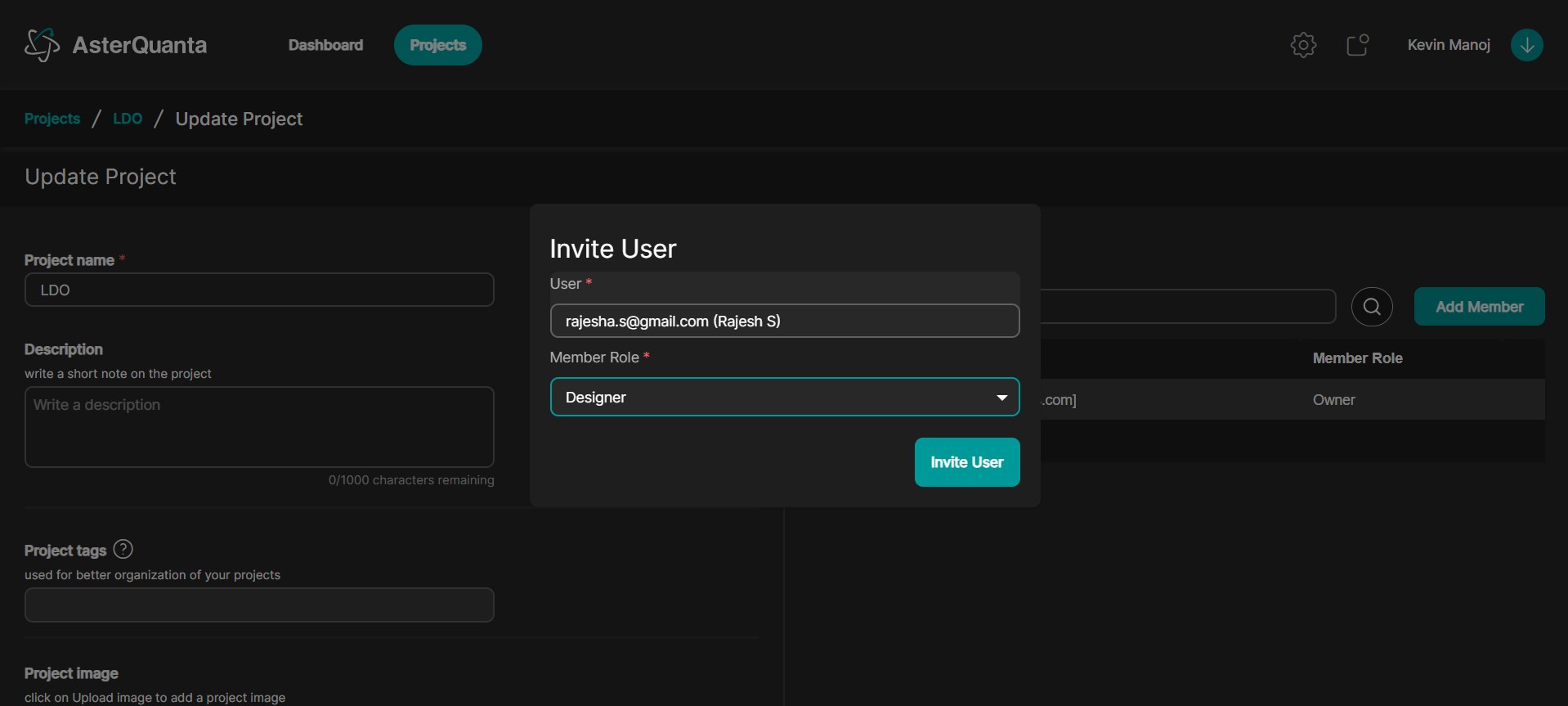
Since this is an Individual Account (either Personal or Professional), you can add users from anywhere on the platform — as seen by the search bar that allows you to find any user across the entire platform.
The Individual Account type is currently implemented in two variants: Personal and Professional.
1. Personal Account (Current Implementation)
This is meant for single users building and managing projects independently.
🔐 Default Roles
- Admin
- Team Roles: Owner, Designer, AI Developer
(Default roles are automatically created when a new user registers.)
🎛️ Role-Based Permissions
Permissions can be configured per role:
- Project: Create, Write, Read, Delete, Publish, Clone
- User: Create, Write, Read, Delete
- Manage Keys: Write, Read
- Manage Connectors: Write, Read
- Manage Agents: Write, Read
- Artifact: Create, Write, Read, Delete, Train Agent, Optimize
👥 Project Team Management
- Each project has a default associated team.
- In a Personal Account, users cannot add other team members.
🔑 API Key Management
- API keys are generated when a Connector or Agent is created.
- Keys are linked to the individual account that created them.
- Key generation is allowed only if the user has the appropriate permissions:
- Manage Keys
- Manage Connectors
- Manage Agents
2. Professional Account (Current Implementation)
Enables limited collaboration and team features for small groups or professional use.
🔐 Default Roles
- Admin
- Team Roles: Owner, Designer, AI Developer
(Default roles are automatically created during registration.)
🎛️ Role-Based Permissions
- Project: Create, Write, Read, Delete, Publish, Clone
- Manage Keys: Write, Read
- Manage Connectors: Write, Read
- Manage Agents: Write, Read
- Team: Write, Read
- Invite User to Team: Write, Read
- Artifact: Create, Write, Read, Delete, Train Agent, Optimize
👥 Project Team Management
- Each project has a default team.
- Users can invite others to join a project using email.
- Invited users can belong to any account type (Individual, Professional, or Organization).
- If an invited user is not yet registered, they must sign up using the same email address the invite was sent to.
🔑 API Key Management
- Keys are created with the account that generates the Connector or Agent.
- Key generation is permission-gated:
- Manage Keys
- Manage Connectors
- Manage Agents
Organization Account
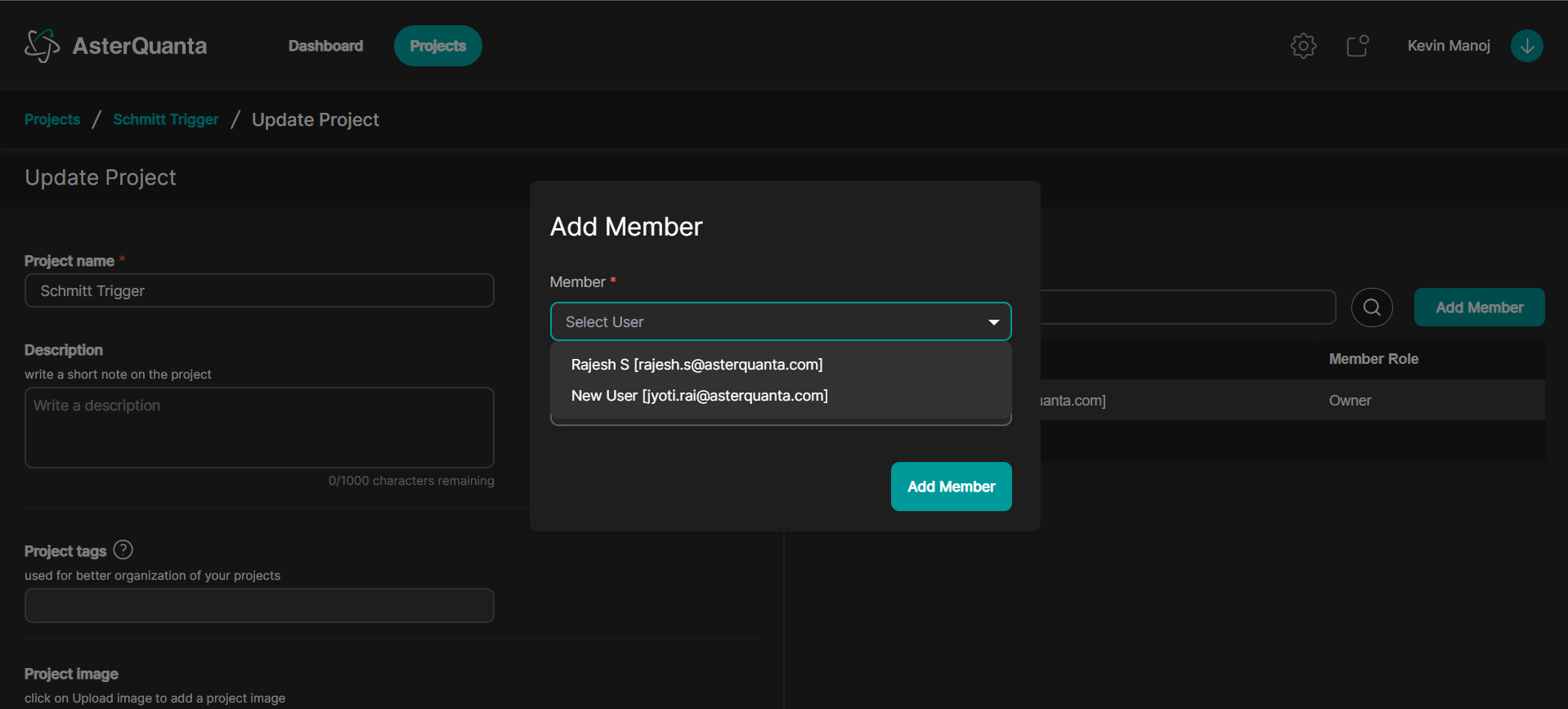
Since this is an Organization Account, you can add users only from within your organization — as seen by the dropdown menu that allows you to find any user exclusively within your organization.
Designed for structured teams and enterprises with centralized control, role assignments, and advanced user management.
👤 User Management
- Admins can create and manage multiple user accounts under the same organization.
🔐 Default Roles
- Admin
- User
- Team Roles: Owner, Designer, AI Developer
(Default roles are initialized when an admin registers the organization.)
🎛️ Role-Based Permissions
- Project: Create, Write, Read, Delete, Publish, Clone
- User: Create, Write, Read, Delete
- Manage Keys: Write, Read
- Manage Connectors: Write, Read
- Manage Agents: Write, Read
- Team: Write, Read
- Artifact: Create, Write, Read, Delete, Train Agent, Optimize
👥 Project Team Management
- Each project has a default team.
- Users within the organization can be assigned to teams.
- Roles can be assigned per user per project.
🔑 API Key Management
- API Keys are generated when a Connector or Agent is created.
- Keys are associated with the user account that created them.
- Key generation is allowed only when the user has:
- Manage Keys
- Manage Connectors
- Manage Agents